Quick answer
Tap Log in at the top of any PariPulse page and enter your email, ID or username and your password. You can also log in with SMS login, Telegram or Google. Forgot the password? Tap Forgot your password? under the form. If it still won't let you in, see the problem table below.
You open PariPulse to check a live bet, and the password that worked yesterday is suddenly rejected. Or you've followed a link from a group chat and the page looks right, but something about it feels off. Both situations are common, and both have straightforward fixes.
This guide covers where to log in, the steps on a phone or computer, how password recovery works, the errors players run into most, and the habits that keep an account safe.
Check the address before you sign in
The only place to enter your PariPulse Nigeria password is:
Lookalike sites copy the colours and layout but sit on a slightly different address. Watch for an extra word (paripulse-login, paripulse-bonus), a swapped letter, or a different ending. When in doubt, close the tab and type paripulse.com.ng yourself instead of following a link.
How to log in to PariPulse
- Open your browser and type paripulse.com.ng, or open the PariPulse app if it's installed.
- Tap Log in in the top-right corner of the page.
- In the first field, enter your email, ID or username. Your ID is the account number shown in My Account and in the cashier.
- Enter your password. Tap the eye icon to check what you've typed.
- Tick Remember only on your own phone or computer, then tap Log in.
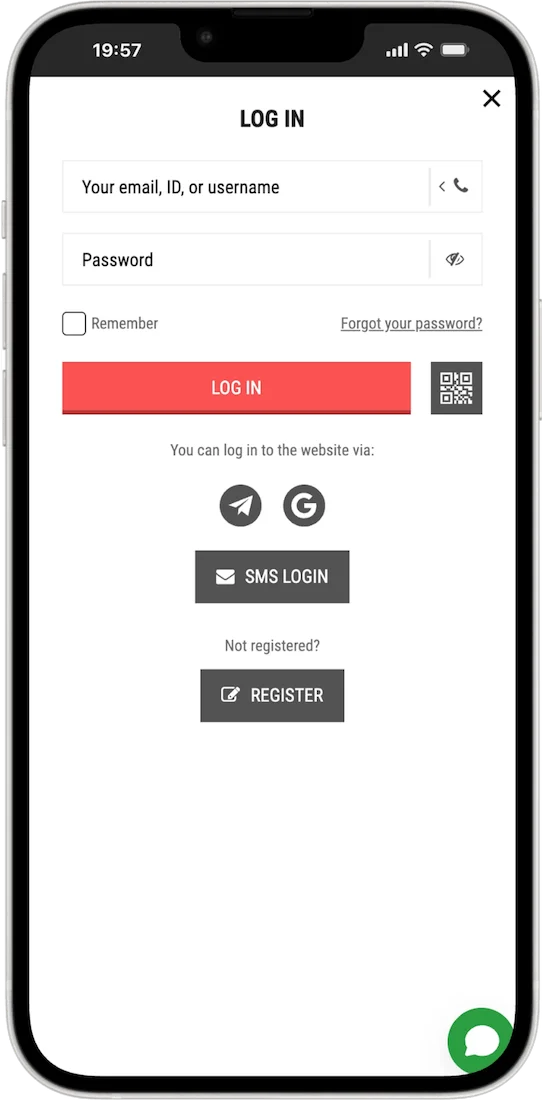
Four ways to log in
| Method | How it works | Best if you registered |
|---|---|---|
| Email, ID or username + password | The standard form | By e-mail, or One-click (use the ID and password you saved) |
| SMS login | A code is sent to the phone number on your account | By phone |
| Telegram | Log in with your linked Telegram account | Through social networks and messengers |
| Log in with your linked Google account | Through social networks and messengers |
Not sure how you registered? Search your SMS messages and email inbox for PariPulse messages from the day you signed up. One-click accounts are the ones most often locked out, because the generated ID and password weren't saved; SMS login works for them once a phone number has been added to the profile.
Logging in on the app or mobile site
Your account isn't tied to a device. The same login details work in the Android app, on the mobile site in any phone browser and on a computer. If the app refuses details that work in a browser, the app is usually out of date; the app update steps fix most cases.
Forgot your PariPulse password?
Tap Forgot your password? under the password field. Recovery works through a contact detail already linked to your account, which is why it pays to add your phone number and email in your profile soon after registering. If your phone number is on the account, SMS login gets you in without the password, and you can then set a new one in My Account.
- You still have the phone or email on the account: follow the recovery link, enter the code you receive, then set a new password you haven't used anywhere else.
- You've lost that SIM or email: contact PariPulse support through the official channels. Have your full name and any account ID ready.
Don't open a second account to get around a lost password. The Accounts, Payouts & Bonuses rules allow one account per person, and a duplicate can complicate bonuses and withdrawals on both.
Common login problems and fixes
| What happens | Likely cause | What to try |
|---|---|---|
| "Incorrect password" every time | A typo, caps lock, or the browser autofilling an old saved password | Type the password manually, delete the saved password in your browser, then use password recovery if it still fails. |
| The page won't load or keeps spinning | Weak network, a stale browser cache, or an outdated app | Switch between Wi-Fi and mobile data, clear the browser cache for paripulse.com.ng, or update the app. |
| The SMS code never arrives | Network delay, the wrong number on the account, or messages filtered as spam | Wait a few minutes before requesting a new code, check your spam or promotions folder, and confirm the number. If it keeps failing, contact support. |
| "Account restricted" or similar message | Pending verification, a security hold, or a self-exclusion period | Contact support through the help page channels. If you set a self-exclusion, it stays in place until its end date. |
| You entered your password on a lookalike site | A phishing page collected your details | Change your password on paripulse.com.ng straight away, then tell support so they can watch the account. |
Keep your account secure
- Use a password you don't use for email, banking or social media.
- Never share a one-time code. Anyone asking for one, even under the PariPulse name or logo, is trying to take over your account.
- Log out on shared or borrowed phones, and don't let the browser save your password there.
- Ignore messages offering to "recover" or "unlock" your account for a fee. Real account help comes through the channels listed on the help page.
- Keep the phone number and email on your profile current, so recovery works when you need it.
Login questions
I don't have an account yet. Where do I start?
Tap Registration at the top of the page. The PariPulse registration guide explains the phone and one-click options step by step.
What is my PariPulse ID?
Your account number. It's shown in My Account and at the top of the cashier, and you can log in with it instead of your email or username.
Can I log in with Telegram or Google?
Yes, if your account is linked to them, for example because you registered through social networks and messengers. Tap the Telegram or Google icon under the login form.
Can I use the same login in the app?
Yes. One account works on the website, the mobile site and the app.
Why am I asked for documents after logging in?
Licensed operators have to confirm who their customers are and that they're adults. The verification section of the registration guide explains what to expect.
Last updated 29 October 2026. Offers, limits and features can change; the terms shown in your account and in the General Terms and Conditions always apply.