Quick answer
Tap Registration, choose a welcome bonus (Sports, Casino + games or decide later), then pick a method: By phone, By e-mail, Social networks and messengers or One-click. Keep Nigeria and NGN selected, add a promo code only if you have one, and tap Register.
Signing up takes a minute. The decisions that matter come with it: which welcome bonus you pick, which method you register with, and whether your account ends up with a verified phone number. Those three choices decide whether your bonus arrives, whether you can recover your password, and how smoothly your first withdrawal goes.
Who can open a PariPulse account
- Adults only. Tapping Register confirms you are of legal age, and the service is marked 18+.
- Nigeria is a supported country, with Nigerian naira (NGN) as the account currency.
- You accept the terms. Registering means agreeing to the Terms and Conditions and the Privacy Policy. When the terms change, existing users are told at least two weeks before the update takes effect.
- One person, one account. If you've registered before, recover that account through the password recovery steps instead of opening another.
Step 1: choose your welcome bonus
The registration window opens with a bonus choice. It decides which welcome offer your first deposit triggers, so pick the one that matches how you'll play:
| Option | What you get | Best for |
|---|---|---|
| Sports | Welcome bonus on your 1st deposit up to ₦150,000. How it works | Mainly betting on football and other sports |
| Casino + games | Welcome package up to ₦700,000 + 150 free spins over four deposits. How it works | Mainly slots, casino and PariPulse Games |
| Cancel | No bonus now; make your choice later in My Account | Undecided, or not wanting wagering conditions yet |
Choosing Cancel isn't final: you can pick a bonus in My Account before your first deposit. Once one bonus type has been received, switching to the other ends your place in the first track.
Step 2: pick one of four ways to register
| Method | Fields you fill in | Worth knowing |
|---|---|---|
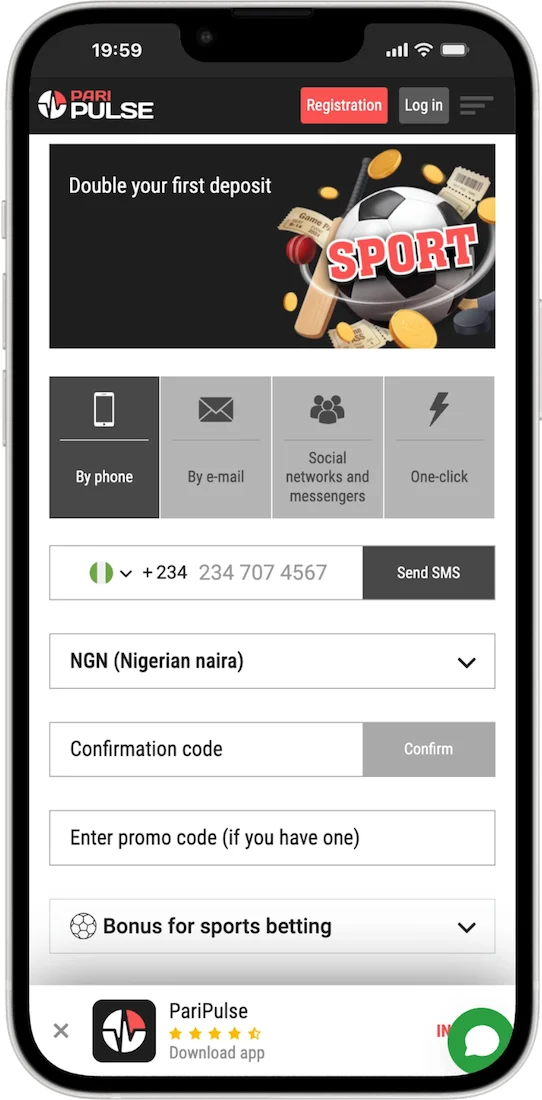
| By phone | Phone number (+234), SMS confirmation code, currency, promo code | Your number is verified from the start, which bonuses require |
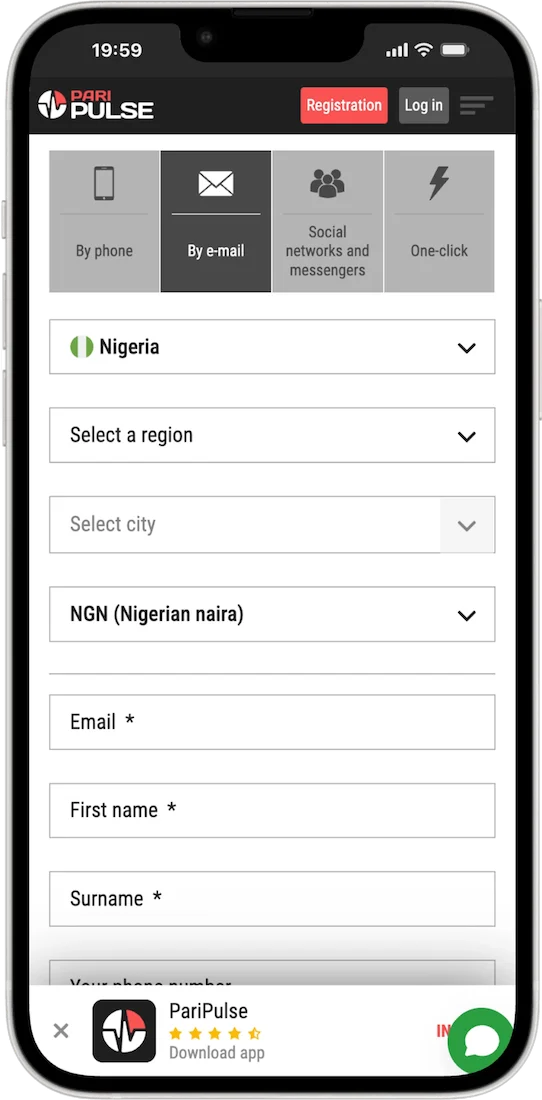
| By e-mail | Country, region, city, currency, email, phone, first name, surname, password, promo code | The most complete profile at sign-up |
| Social networks and messengers | Your chosen social account, country, currency, promo code | Later logins take two clicks |
| One-click | Country, currency, promo code | Fastest, but you'll complete your profile later |
Register by phone
- Choose By phone. The country code shows the Nigerian flag and +234.
- Enter your mobile number and tap Send SMS.
- Type the code from the SMS into Confirmation code and tap Confirm.
- Check the currency shows NGN (Nigerian naira), add a promo code if you have one, and tap Register.
Use a SIM you'll keep: the number becomes your route for password recovery and the activated phone that every PariPulse bonus asks for.
Register by e-mail
- Choose By e-mail and check the country shows Nigeria.
- Select your region and city, and keep the currency as NGN.
- Enter your email, phone number, first name and surname exactly as they appear on your ID.
- Create a password, re-enter it, add a promo code if you have one, and tap Register.
Register with social networks and messengers
Choose Social networks and messengers, select a network and allow PariPulse to use your profile information for registration. Keep Nigeria and NGN selected, add a promo code if you have one, and tap Register. Afterwards you can log in with that account in two clicks, or with a login and password.
One-click registration
Choose One-click, check Nigeria and NGN, add a promo code if you have one and tap Register. Your account is created straight away. Save the login details shown, then open My Account and add your name, email and phone number: until you do, you can't receive bonuses or recover your password.
Step 3: complete your profile
Whichever method you used, finish these in My Account before your first deposit:
- Fill in every personal information field: full name, email, phone and country of residence.
- Activate your phone number.
- Tick participation in bonus offers in Account Settings, so welcome and weekly bonuses can be credited.
- Choose a deposit method in naira. Crypto deposits don't earn bonuses.
Account verification
Licensed operators have to confirm who their customers are and that they're adults; it's also part of anti-money-laundering rules. PariPulse publishes a KYC Policy and an Anti-Money Laundering policy among its terms and policies, and those documents set out what may be requested.
In practice, expect to confirm your contact details and, when asked, provide proof of identity. PariPulse can also ask for a photo of you holding your ID, or verify you by phone. Three habits keep it painless:
- Register under your real name, spelled the way it appears on your ID.
- Keep your profile details accurate; a mismatch is the most common reason verification stalls.
- Use payment accounts in your own name.
Registration problems
| Problem | What it usually means | What to do |
|---|---|---|
| "Phone number already registered" | An account already exists for that number, perhaps one you made earlier. | Try logging in with SMS login or recovering the password rather than registering again. |
| The SMS code never arrives | Network delay or a mistyped number. | Check the number after +234, wait a few minutes, then tap Send SMS again. Contact support if it keeps failing. |
| The Register button does nothing | A required field is empty, or the phone code hasn't been confirmed. | Look for highlighted fields, and tap Confirm after entering the SMS code. |
| The two password fields don't match | The two password fields differ (By e-mail). | Retype both, checking caps lock. |
| The promo code is rejected | Typo, expired code, or a code for a different offer. | See why promo codes fail. You can still register without one. |
| No welcome bonus after the first deposit | Profile incomplete, phone not activated, bonus not chosen, or a crypto deposit. | Complete step 3 above before depositing. |
Registration questions
Which registration method is best?
By phone or By e-mail. Both leave you with a verified contact detail, which bonuses and password recovery depend on. One-click is fastest but needs finishing in My Account.
Can I register without a promo code?
Yes. The promo code field is marked "if you have one", and the form works without it.
Can I change my welcome bonus choice?
Before your first deposit, yes, in My Account. After you've received one bonus type, switching to the other ends your place in the first track.
Is registration free?
Opening an account costs nothing. You only spend money when you choose to deposit.
Can I use the same account in the app?
Yes. Log in to the Android app, the iOS option or the mobile site with the same details you use on the website.
Last updated 29 October 2026. Offers, limits and features can change; the terms shown in your account and in the General Terms and Conditions always apply.